Analytics
The Analytics page provides deeper insights into business performance. All data is sourced from your billing engine and refreshed every 15 minutes.
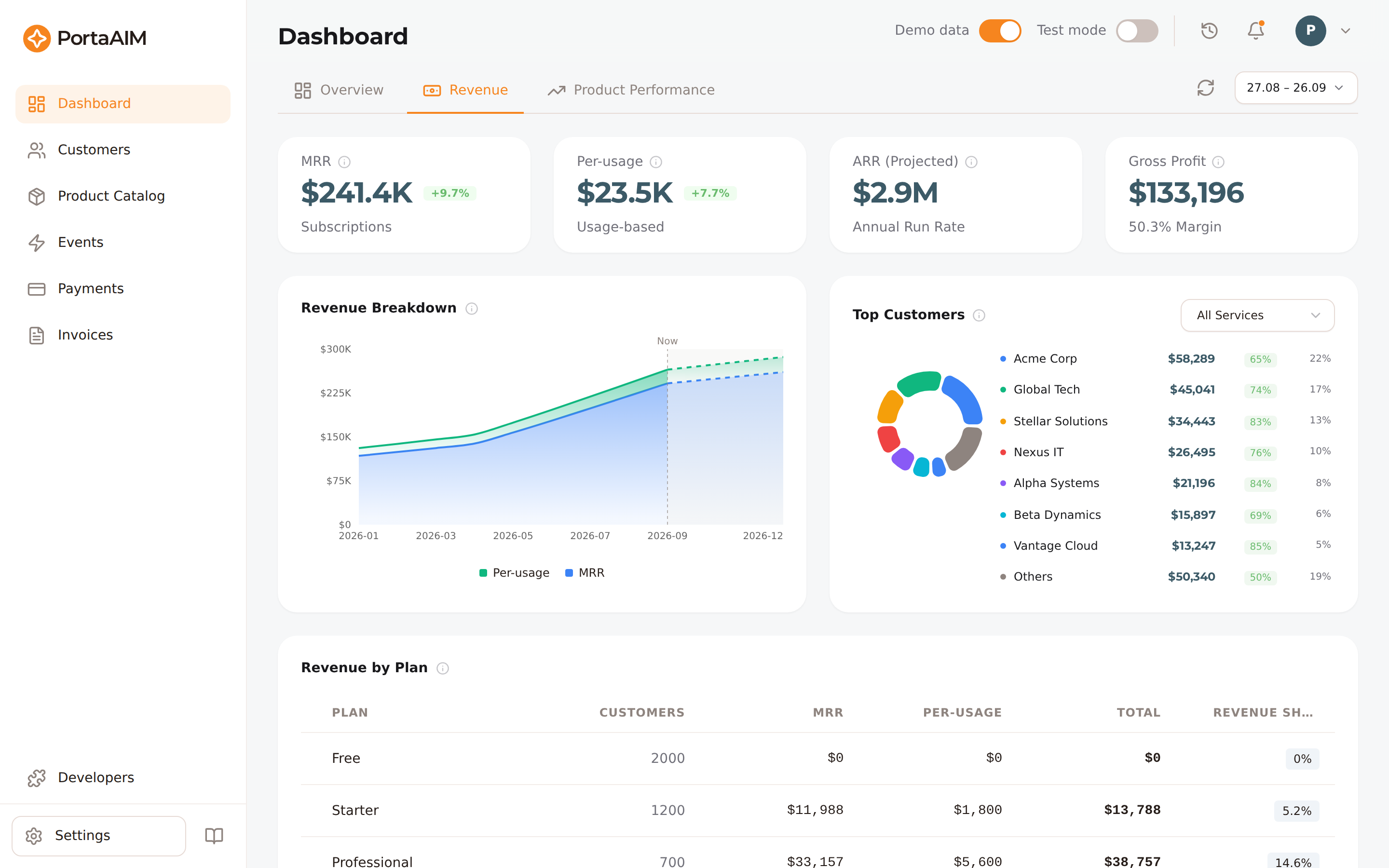
Revenue analytics: MRR, per-usage, projected ARR, the revenue-breakdown trend, top customers, and revenue by plan.
All metrics reflect real billing data aggregated automatically. No manual refresh is needed. See Analytics Data Freshness for cadence details.
Overview Tab
KPI Cards
Four summary cards at the top:
- Total Revenue — net revenue for the period (subscriptions + usage charges, after prorated credits)
- Active Customers — customers currently with Active status
- Invoice Pipeline — outstanding unpaid invoice balance
- ARR — Annualised Recurring Revenue (current MRR × 12)
Alerts (coming soon)
Configurable alerts (churn spike, revenue drop, MRR drop, etc.) and the per-tenant threshold UI to drive them are on the roadmap. Once shipped, active alerts will appear here below the KPI cards.
Revenue Tab
MRR
Current Monthly Recurring Revenue — the sum of all active customers' subscription fees at this moment. This is a snapshot value and is not affected by mid-month plan changes or proration.
Daily Revenue Trend
Daily revenue chart for the selected period broken into:
- Subscriptions — plan fees
- Usage — per-unit service charges
The day after a plan change might show a negative subscription value, and that is correct behaviour. A proration refund for the old plan and a new-plan charge both post once the customer's next day starts, not at the change itself, and the net of the two can be negative.
Monthly Revenue with Projection
A separate monthly view shows past months alongside a 3-month forward projection (dashed line). The projection uses linear extrapolation of recent MRR and per-usage trends — not just current MRR — so growth or churn signals flow through to the forecast.
Revenue by Plan
Table showing each plan's active subscribers, the MRR they pay, and the plan's usage revenue for the month. The MRR column adds up to the MRR card, and a customer who leaves a plan stops counting toward it at the next refresh. Total adds the MRR to the usage revenue, while Revenue share % is the plan's share of what the month billed, so a plan with subscribers who have not been billed yet shows a Total beside a 0% share.
Top Customers
The seven highest-revenue customers in the period, with total revenue and gross margin percentage; everyone else is rolled up into a single Others row. Hover a customer (in the list or in the donut chart) for a full breakdown: subscription vs. usage-based revenue, vendor cost, and their share of total revenue for the period.
Revenue is net of refunds, so a customer who moves to a cheaper plan is ranked by what they paid after the refund. A customer refunded more than they were charged in the month is counted in Others rather than listed.
A service picker above the chart appears once at least one service has usage data this month, letting you rank customers by usage of that one service instead of by revenue. Margin isn't available in this view.
Customers Tab
Counts
- Active — all customers with Active status
- Paid — active customers on a paid plan (base plan fee > 0)
- Free — active customers on a free plan (base plan fee = 0)
The paid/free split uses the plan's base monthly fee. A customer with a 100% individual discount is still counted as "paid" — their plan has a non-zero base fee even if they currently pay nothing.
Growth Chart
Daily new signups and terminations. Churned customers display as negative bars so net growth is immediately visible.
Churn date attribution
Churn is attributed to the date from terminate_on if set, otherwise billed_to. In rare cases where neither field is populated, churn is attributed to today with a log warning.
Invoice Pipeline
Receivables health at a glance:
- Outstanding balance — total balance across all unpaid and previous-balance invoices
- Open / Overdue count — how many invoices are current vs. past their due date
- Aging breakdown — balance bucketed by how overdue: current, 1–30 days, 31–60, 61–90, 90+ days
Plans Page Analytics
Each plan has its own analytics sheet. Open any plan and click the Analytics tab. See Plan Analytics for details.
Switching Environments
Use the environment toggle (top-right) to switch between Live and Sandbox. Each environment has completely separate analytics — aggregation runs independently for both.